1-716-427-0892  |  Mon-Fri: 8AM - 3PM (EST)  |  Sat & Sun: Closed

Unlock Hidden Wealth: Master Arbitrage with Libra Liquidity Auctions

If you’ve been looking to dive into arbitrage sales, one excellent yet often overlooked source is the world of auctions. Specifically, Libra Liquidity Auctions can be a lucrative platform to buy products at a low cost and resell them at a higher price on other markets. This guide will help you understand how to leverage Libra Liquidity Auctions for successful arbitrage.

What is Arbitrage in Auctions?

Arbitrage in the auction space involves purchasing products at a lower price from auctions and selling them on other platforms, such as Amazon or eBay, for a profit. Auctions like those offered by Libra Liquidity Auctions provide a steady stream of discounted goods that are perfect for resellers looking to take advantage of price discrepancies across different marketplaces.

What Are Libra Liquidity Auctions?

Libra Liquidity Auctions are online auction events where companies liquidate excess inventory, overstocks, or returned items. These auctions provide products at a fraction of the retail price, creating an excellent opportunity for arbitrage. The variety of items is broad, covering everything from electronics and household items to apparel and more.

Why Choose Libra Liquidity Auctions for Arbitrage?

Wide Product Selection: Libra offers a vast array of products that appeal to various markets, allowing you to diversify your inventory.
Competitive Pricing: Since auction prices are often below retail, the potential for profit through reselling is significant.
Reliability: Libra Liquidity Auctions are known for their transparent bidding processes, so you can trust the integrity of each auction and the product descriptions.

Steps to Start Arbitrage with Libra Liquidity Auctions

  1. Conduct Market Research
    Before placing bids, research popular products in the resale market. Check pricing trends on platforms like eBay and Amazon to ensure you understand which items have a good resale value.
    Look for items with consistent demand, as these are more likely to sell quickly and for a good margin.
  2. Set a Budget and Bidding Strategy
    Determine a budget that aligns with your profit goals. Avoid over-bidding, which can cut into your profit margins.
    Consider using bidding tools available through Libra Liquidity Auctions to help automate and streamline the bidding process.
  3. Calculate All Associated Costs
    Be sure to factor in all costs associated with purchasing, storing, and shipping the product. Auction fees, shipping costs, and platform fees on Amazon or eBay will impact your final profit.
    If possible, look for items that are easy to ship or have low storage costs to keep expenses manageable.
  4. Manage Your Inventory Efficiently
    Once you’ve won items, list them quickly on your chosen reselling platform. Speed is essential in arbitrage to keep cash flow steady and minimize storage fees.
    Use inventory management software if you’re purchasing in high volume to stay organized and efficient.
  5. Optimize Listings for Fast Sales
    On platforms like Amazon, take advantage of well-written descriptions, quality photos, and keywords that resonate with potential buyers.

Maximizing Profits with Arbitrage on Libra Liquidity Auctions

The key to success in arbitrage through auctions is volume and efficiency. By regularly participating in Libra Liquidity Auctions, you can consistently find valuable items to resell at a profit. Be diligent in tracking costs, optimizing listings, and monitoring market trends. Over time, as you become more familiar with Libra’s platform and auction dynamics, you can develop a refined approach that boosts your profit potential.

Final Thoughts

Libra Liquidity Auctions offer a promising avenue for anyone looking to succeed in arbitrage sales. With the right research, careful bidding, and efficient inventory management, you can turn auction buys into profitable resales. Arbitrage in the auction space is an exciting opportunity, and with platforms like Libra, it’s more accessible than ever.

How to clear cookies and cache in every browser

How to clear cookies on Chrome

As one of the most popular internet browsers, Google Chrome is available on many devices—and there’s a way to remove cookies from each one.

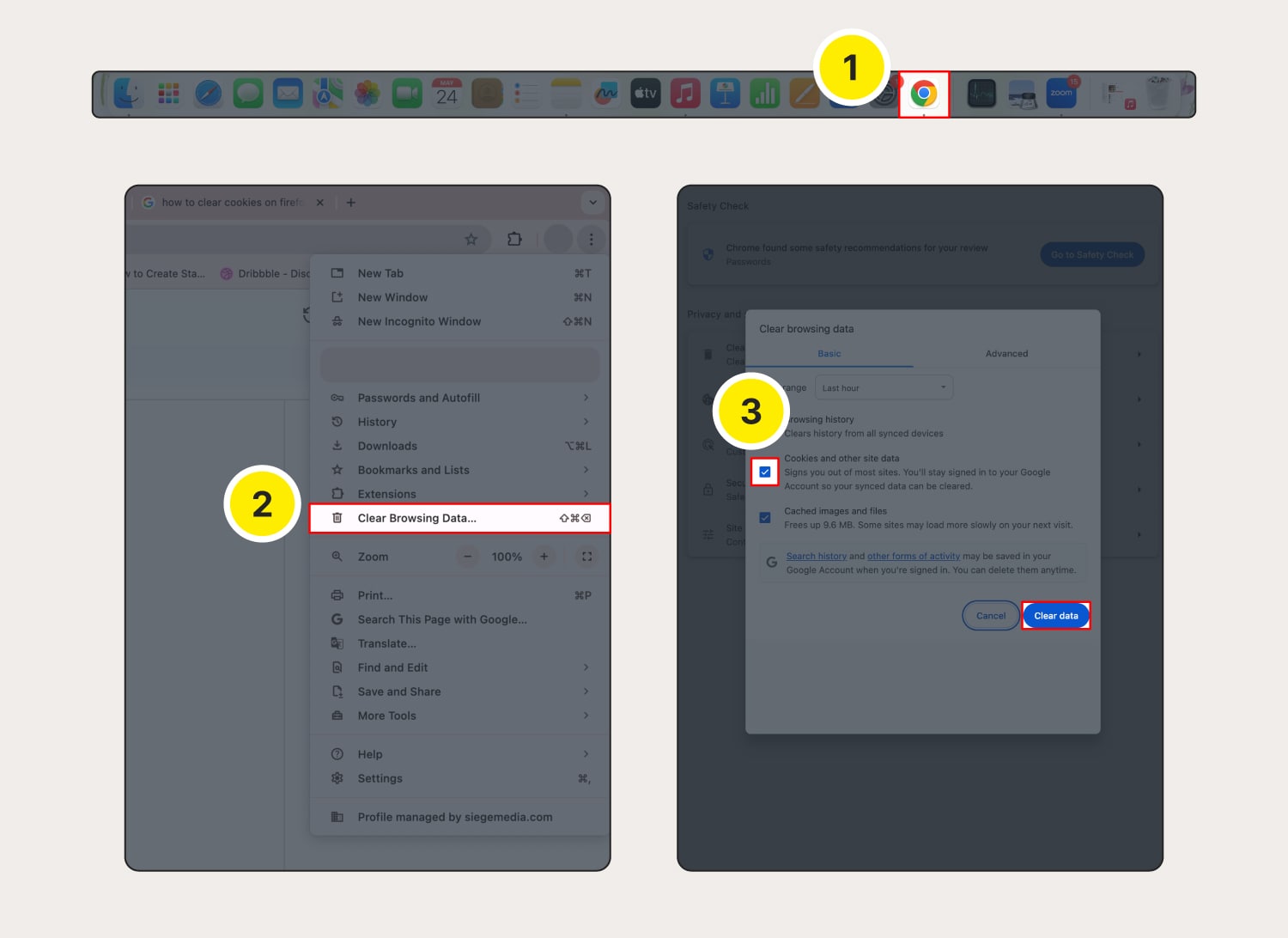
Chrome on a Windows or Mac computer

How to clear cache and cookies on Chrome:

Open Chrome.
Click the three dots in the top-right corner, then select Clear Browsing Data.
Choose the time range for which you want to clear cookies. Mark the checkbox next to Cookies and other site data and any other data you want to clear (like cache), then click Clear data.

Chrome will then start clearing the selected browsing data, including cookies.

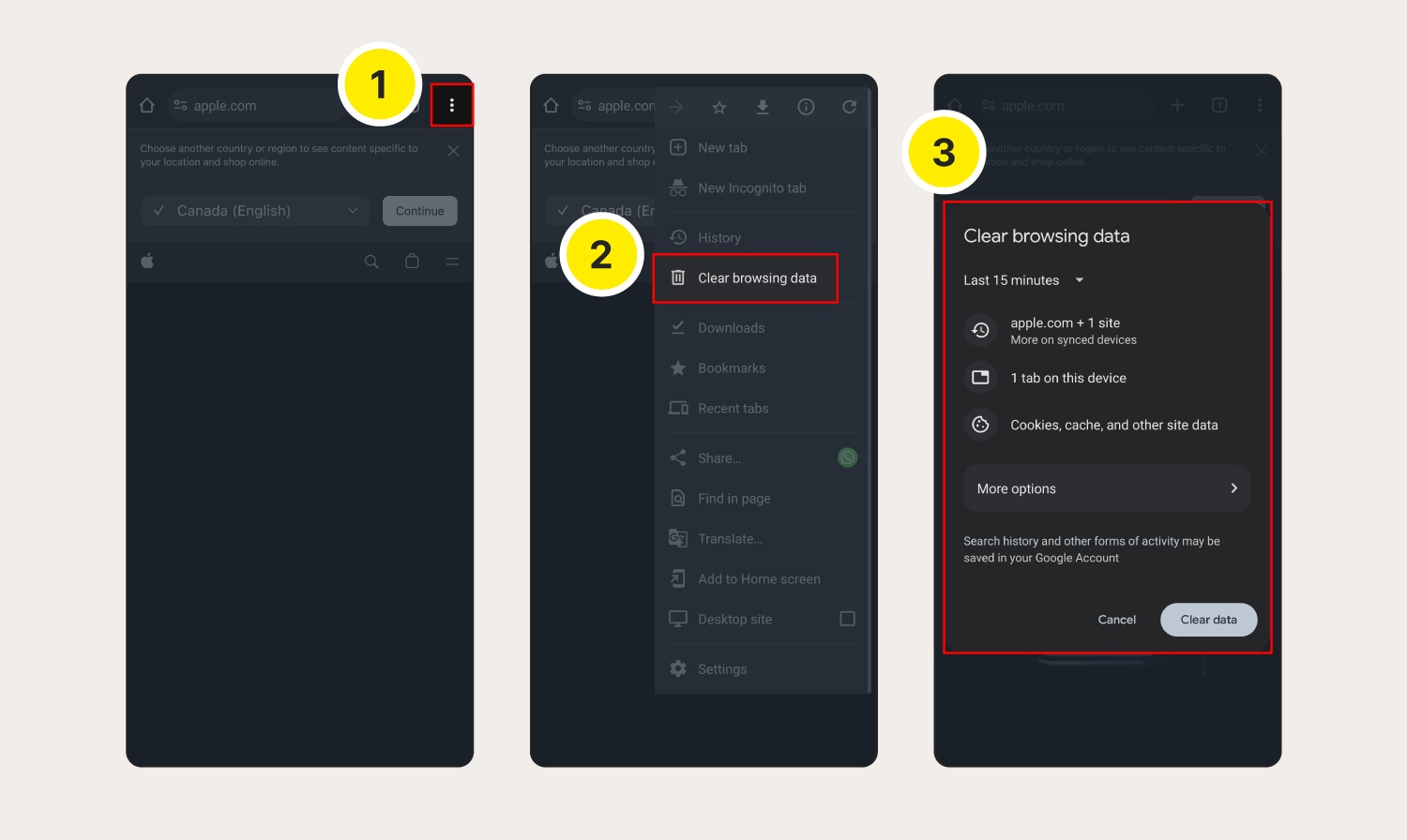
Chrome on your Android device

Here’s how to clear cache and cookies on Chrome on your Android device:

Open Chrome and tap the three dots in the top-right corner.
From the menu, select Clear browsing data.
Next, choose the time range and tap Clear data to confirm deletion.

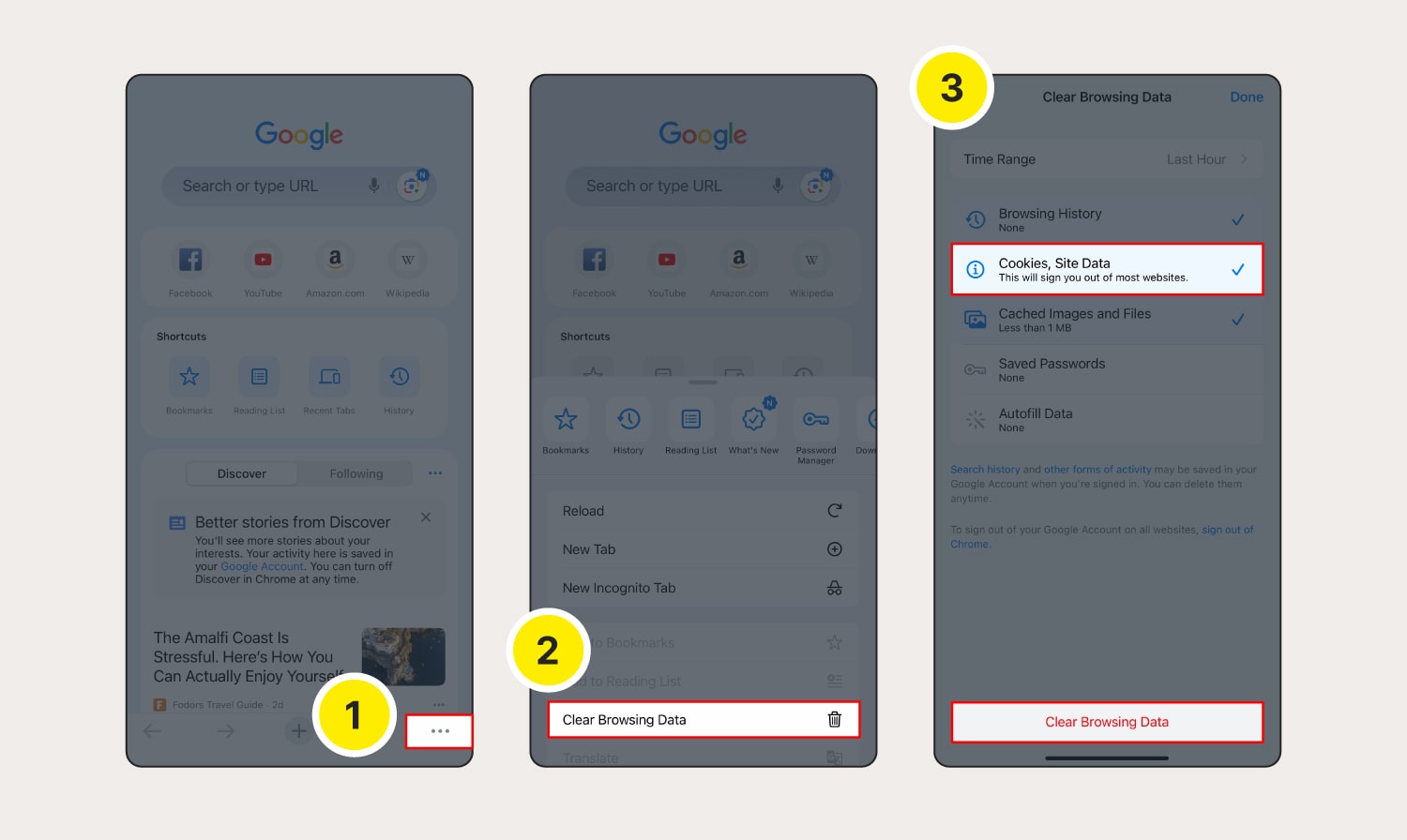
Chrome on your iOS device

Here’s how to clear cookies on Google Chrome on your iPhone or iPad:

Launch Chrome and tap the three dots in the bottom right.
Select Clear Browsing Data.
Choose the time range for which you want to clear cookies, select Cookies, Site Data, and any other data you want deleted, then tap Clear Browsing Data.

How to clear cookies in Safari

It’s easy to clear cookies on Apple’s default browser, but the process is a bit different on desktop and mobile.

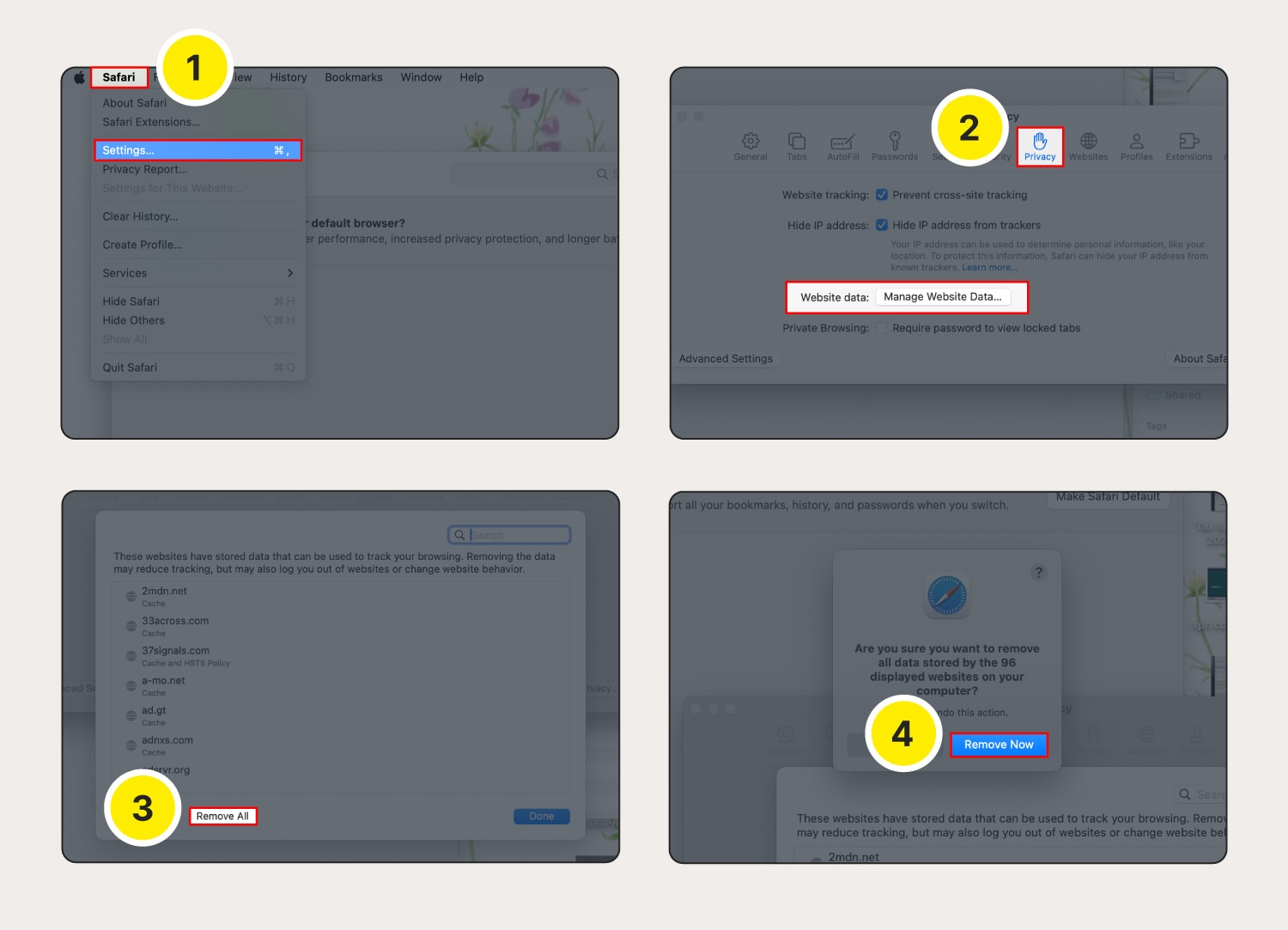
Safari on your macOS

Here’s how to clear cookies on Safari on a computer (macOS device):

Launch Safari, then click the Safari menu and Settings.
Choose the Privacy tab, then click Manage Website Data.
Click Remove All.
Confirm by clicking Remove Now.

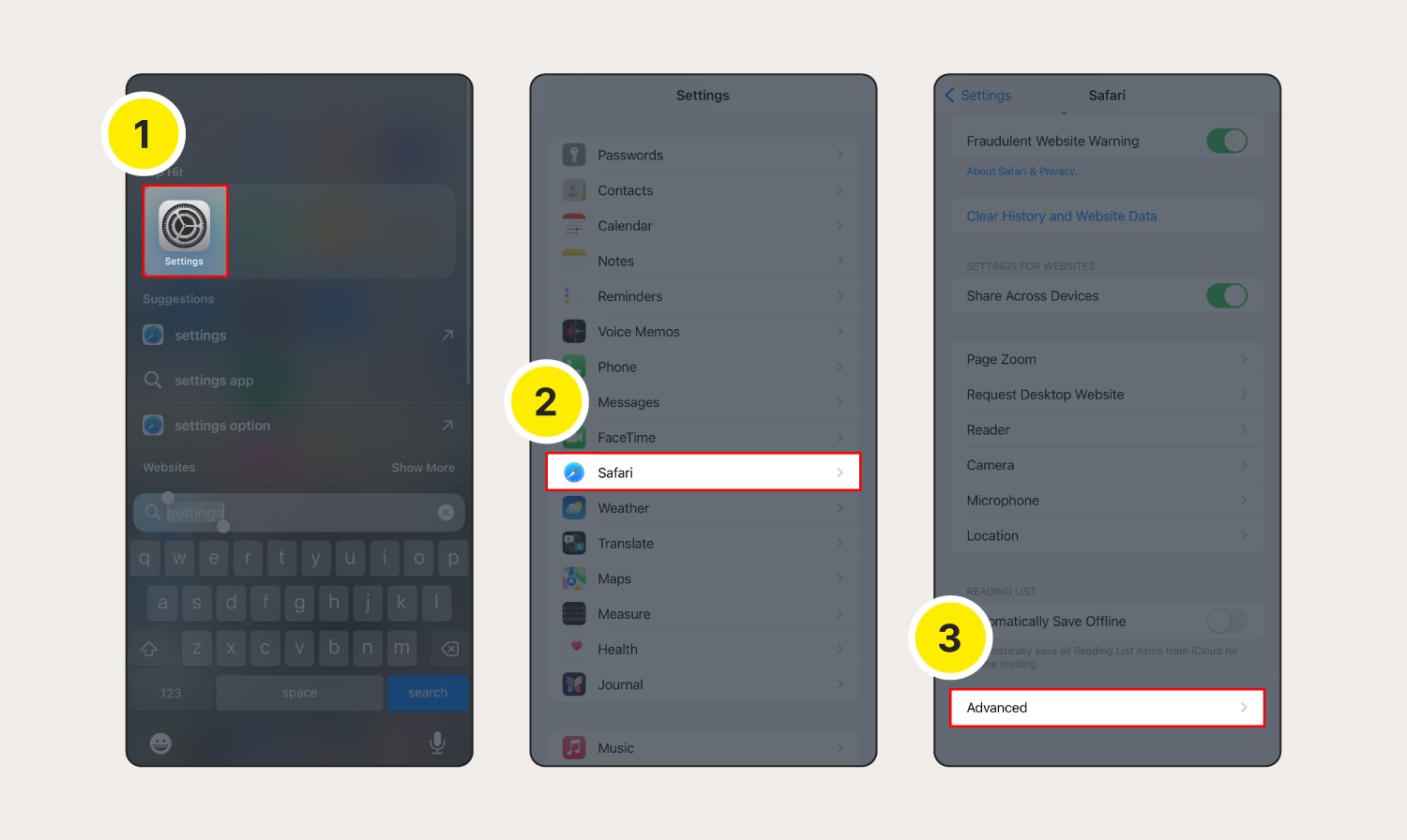
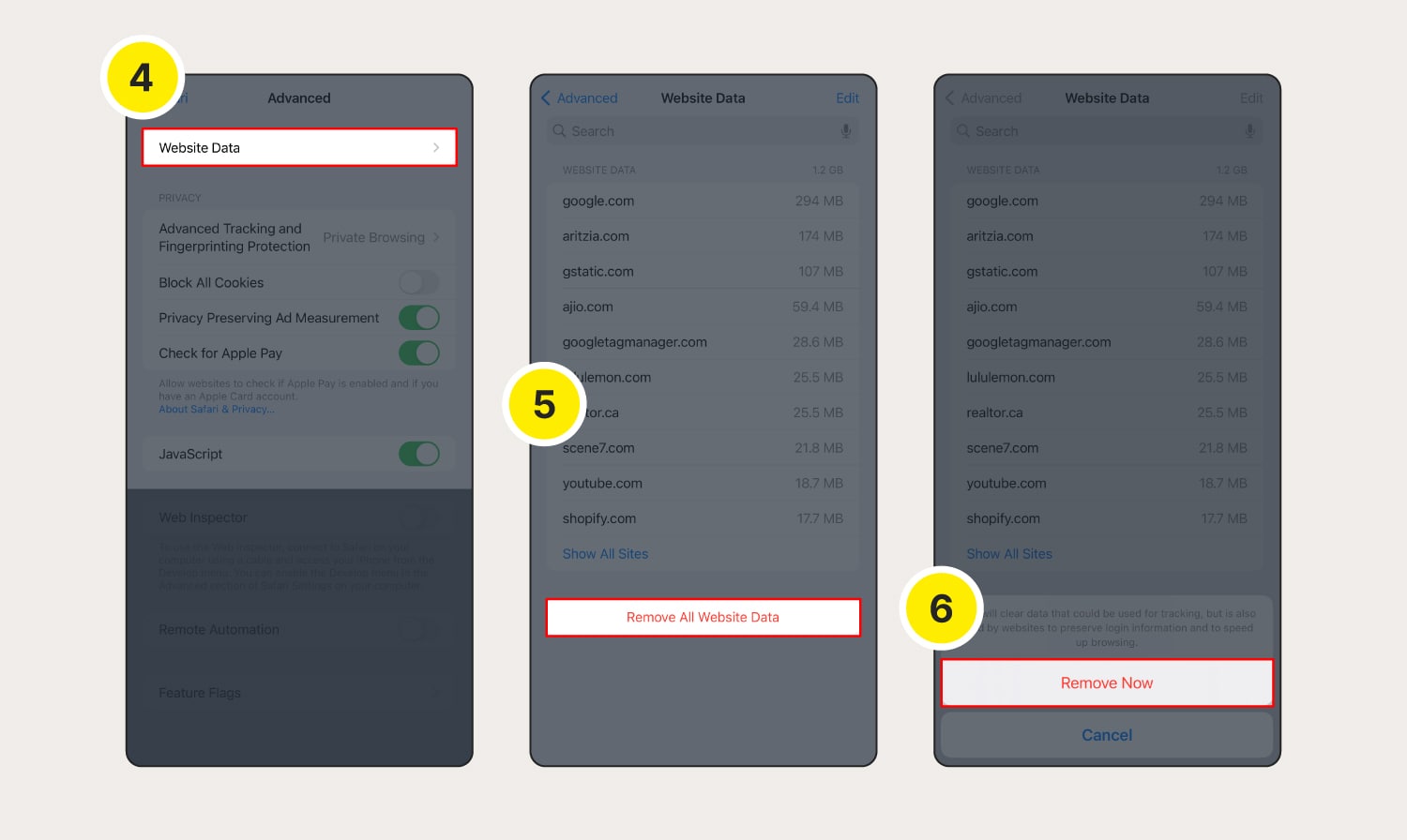
Safari on your iOS device

Clearing Safari cookies on an iOS device is also simple. Here’s how to do it:

Go to Settings.
Scroll down and tap Safari.
Scroll down and tap Advanced.
Tap Website Data.
Tap Remove All Website Data.
Tap Remove Now to confirm deletion.

How to clear cookies in Firefox

Follow these steps to delete cookies in Firefox across your desktop and mobile devices.

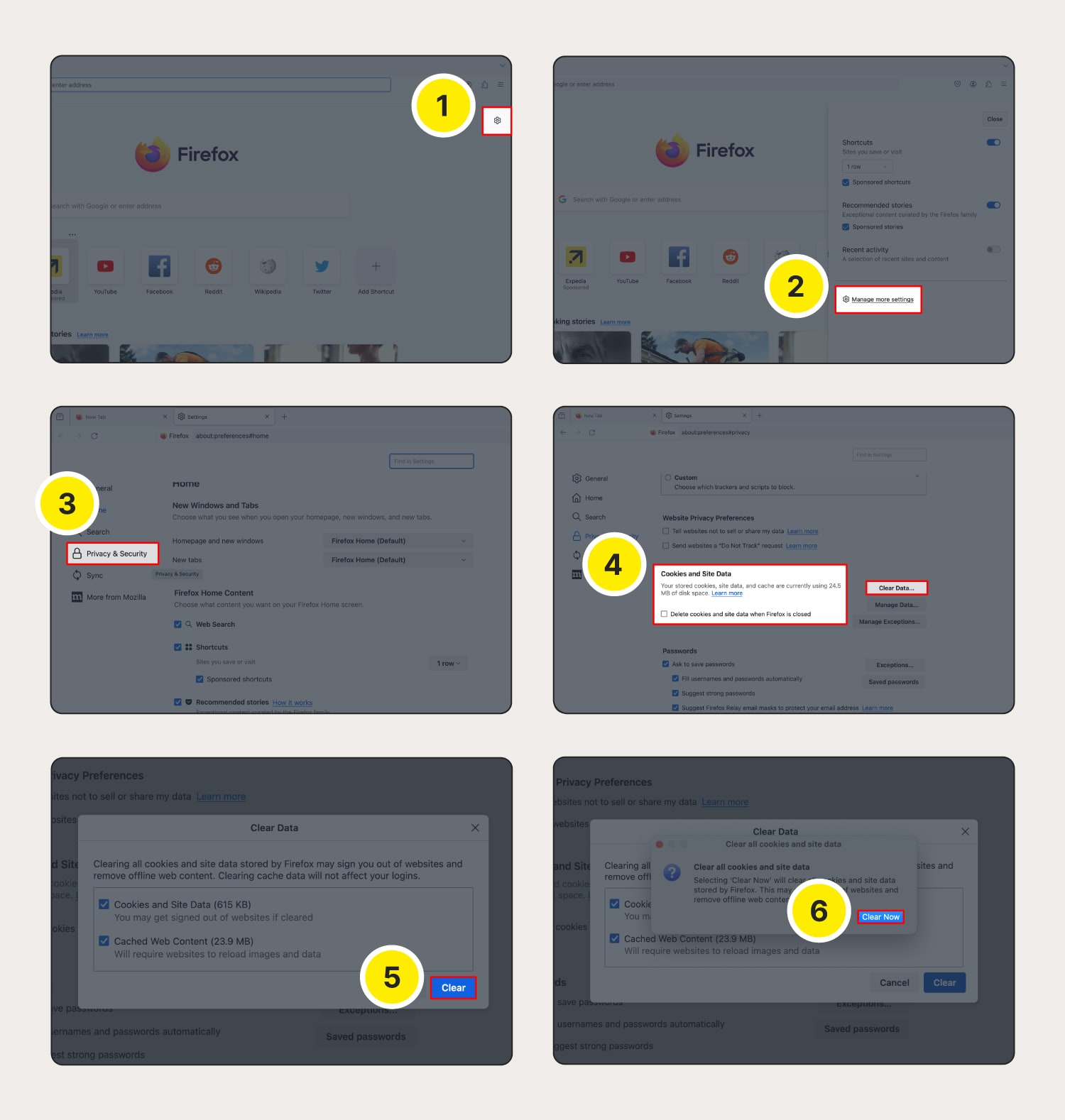
Firefox on your Windows or Mac computer

Here’s how to clear cache and cookies on your Firefox browser:

Open Firefox and click the settings icon in the top-right corner of the homepage.
Click Manage more settings.
Select Privacy & Security.
Scroll down to Cookies and Site Data and then click Clear Data.
Choose whether to delete cookies and/or cache, then select Clear.
Click Clear Now to confirm cookie and site data deletion.

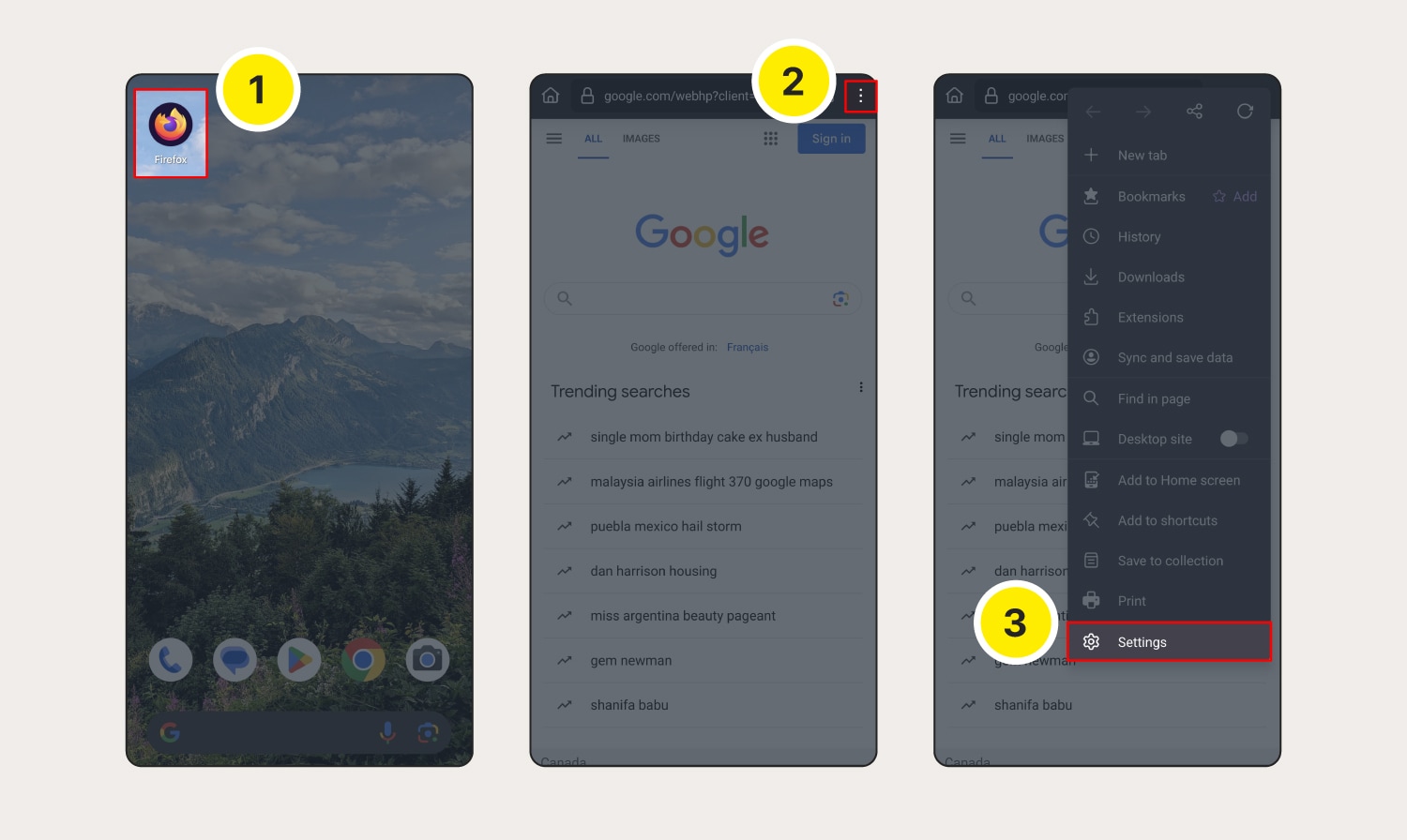
Firefox on your Android device

Here’s how to clear cookies and cache on Firefox on an Android:

Launch Firefox.
Tap the three dots (menu) at the top-right corner.
Go to Settings.
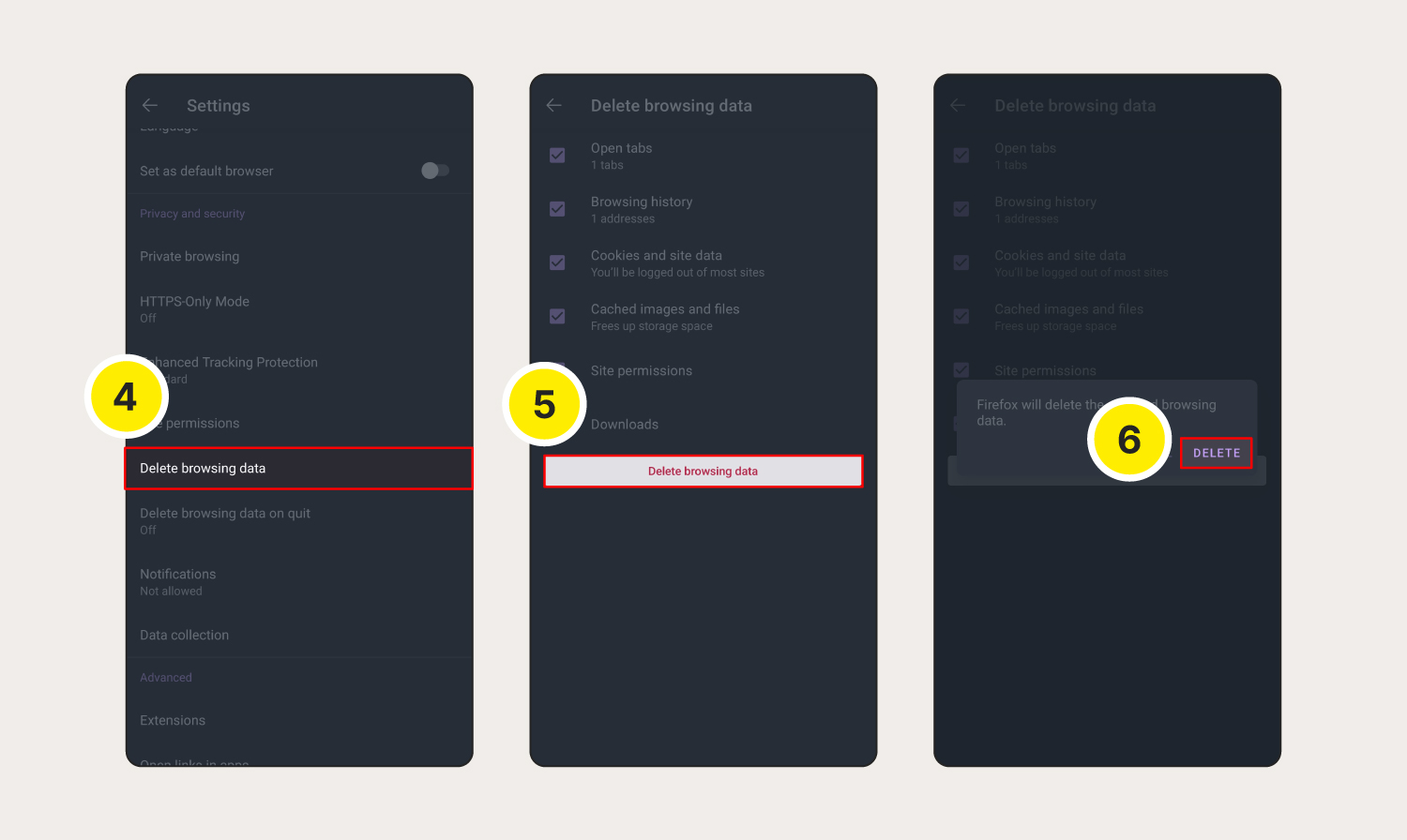
Scroll down and tap Delete browsing data.
Select Cookies and site data and Cached images and files, and any other data you want cleared, then tap Delete browsing data.
Select Delete in the pop-up window.

Firefox on your iOS device

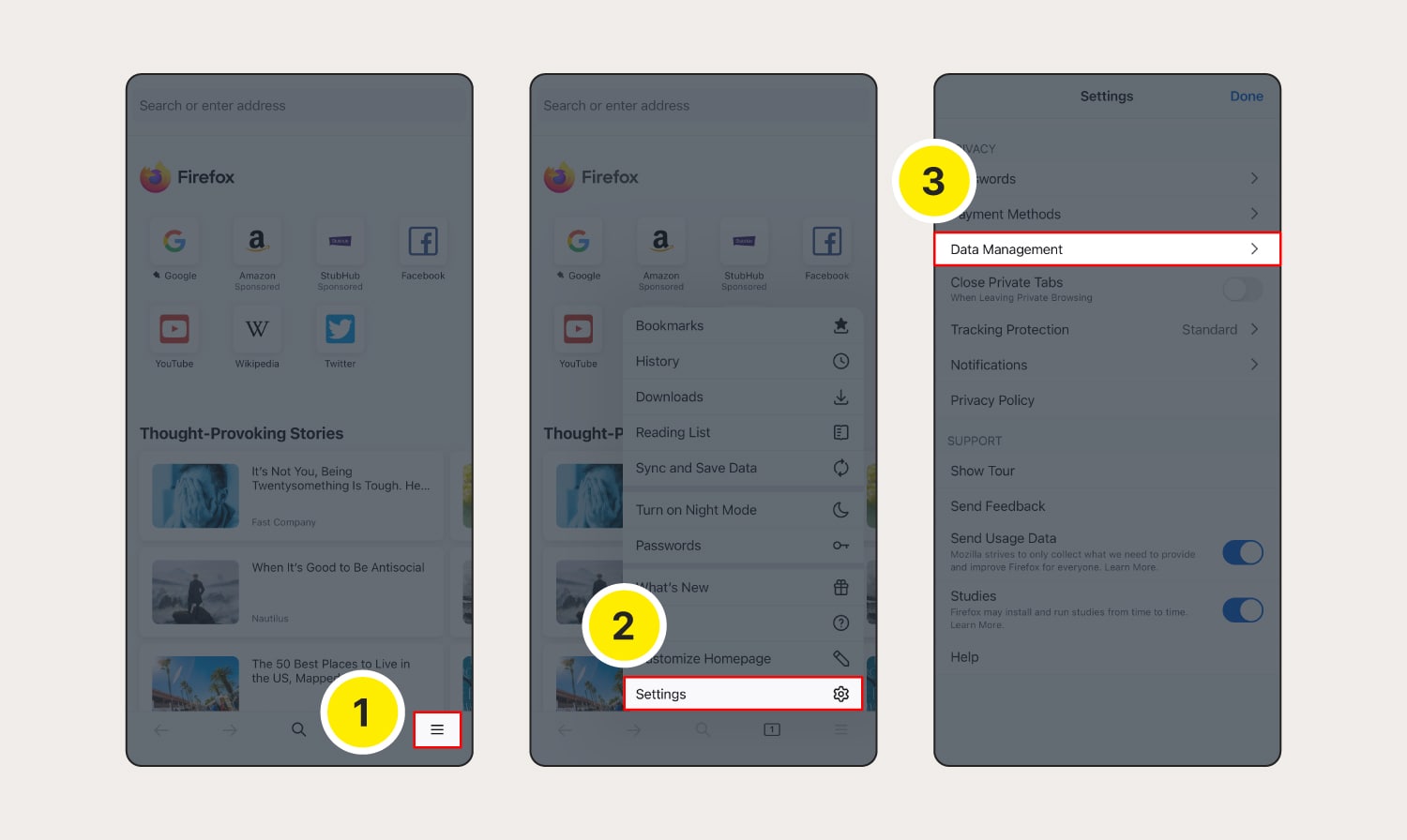
To clear cookies on Firefox on your iPhone or iPad, follow these steps:

Launch Firefox, then tap the three horizontal lines.
Select Settings from the menu.
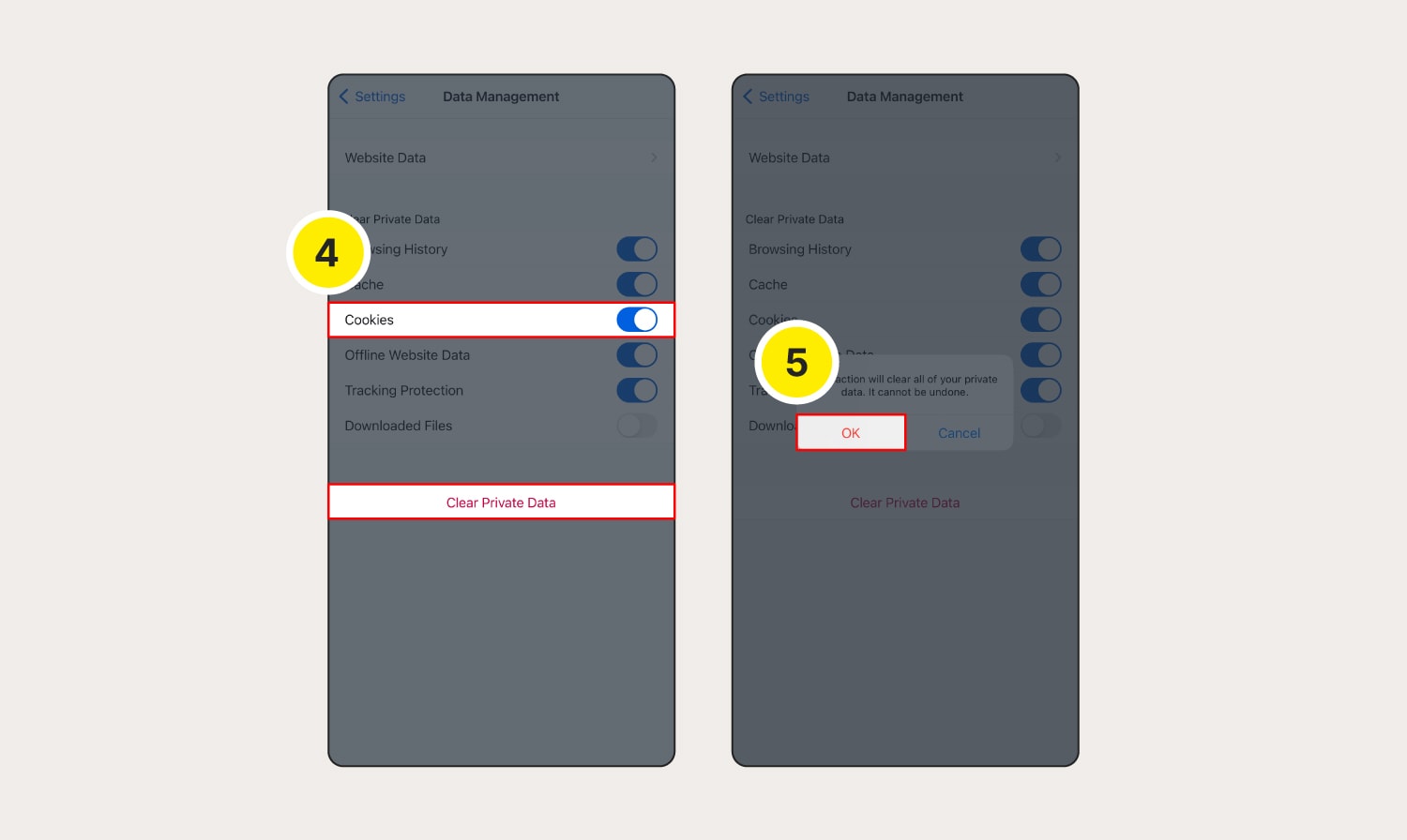
Scroll down to Privacy and select Data Management.
Toggle on Cookies and any other data you want deleted, then tap Clear Private Data.
Choose OK to confirm deletion.

How to clear cookies on Microsoft Edge

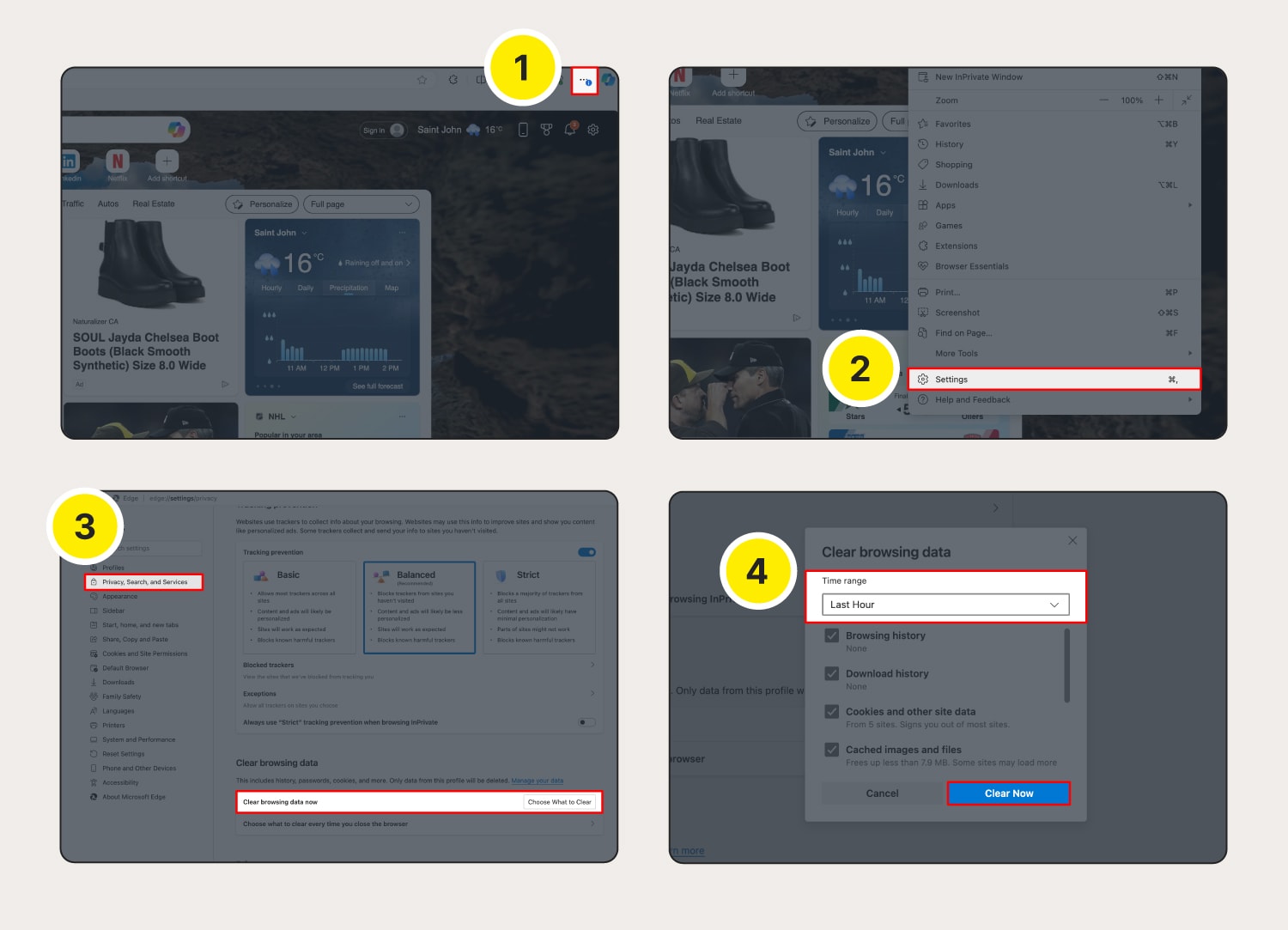
How to clear cookies on Microsoft Edge on a computer:

Launch Microsoft Edge and click the three dots on the top right corner.
Select Settings from the menu.
Go to Privacy, search, and services, then next to Clear browsing data now select Choose what to clear.
Select a time range and click Clear Now to confirm.

The steps for clearing cookies on Microsoft Edge on Android or iOS are virtually identical to the process on a computer:

Tap the three lines (Android) / three dots (iOS) at the bottom of the screen.
Tap Settings > Privacy and security > Clear browsing data.
Choose the time range and the data you want cleared, then tap Clear data (Android) / Clear now (iOS).

How Mobile Apps Are Making Industrial Auctions More Accessible

The industrial auction landscape has transformed with the rise of mobile technology. How mobile apps are making industrial auctions more accessible highlights a revolution in efficiency, convenience, and reach for both buyers and sellers. This article explores the impact of mobile apps, offering insights, examples, and actionable strategies.


The Role of Mobile Apps in Industrial Auctions

Mobile apps have bridged the gap between traditional auction practices and modern technology. By providing real-time updates, intuitive interfaces, and on-the-go functionality, these apps have democratized access to industrial auctions.


Benefits of Mobile Apps for Industrial Auctions

1. Accessibility Anytime, Anywhere

  • How It Works: Mobile apps enable users to browse, bid, and monitor auctions regardless of location.
  • Example: A contractor in a remote area uses an auction app to secure essential equipment during a lunch break, saving time and effort.

2. Real-Time Notifications

  • Why It Matters: Instant updates on bids, auction schedules, and results keep users informed and competitive.
  • Stat: Apps with push notifications see 40% higher user engagement compared to web-based platforms.

3. User-Friendly Interfaces

  • What It Does: Simplified navigation and clear visuals make it easier for users of all experience levels to participate confidently.

4. Secure Transactions

  • Benefit: Mobile apps offer encrypted payment options, ensuring secure and seamless financial transactions.

Features That Enhance Accessibility

1. Item Browsing with Filters

  • Search by category, location, or price range to find items quickly.

2. Virtual Item Previews

  • Detailed photos and videos allow users to inspect items without attending in person.

3. Multilingual Support

  • Catering to a global audience, many apps include language options to accommodate diverse users.

4. Personalized Dashboards

  • Track your bids, watchlists, and auction history in one place.

Real-World Success: Mobile Apps in Action

Case Study 1: Increased Seller Reach
A seller listed surplus electrical transformers on Bidding.LibraLiquidity.com. They attracted international buyers who wouldn’t have participated otherwise. The auction achieved a 25% higher sale price than expected.

Case Study 2: Efficient Buyer Participation
A small business owner secured industrial circuit breakers through a mobile app while traveling. The app’s instant notifications allowed them to place timely bids and win the auction.


Tips for Using Mobile Apps in Industrial Auctions

  1. Download Trusted Apps
  2. Enable Notifications
    • Stay updated on bidding activity and auction schedules.
  3. Familiarize Yourself with Features
    • Explore app functionalities like search filters and payment options before participating.
  4. Plan Ahead
    • Research items and set budgets to bid strategically.

Conclusion: The Future of Industrial Auctions is Mobile

Mobile apps have redefined the auction experience, making it more accessible, efficient, and secure. By embracing how mobile apps are making industrial auctions more accessible, businesses can unlock new opportunities and thrive in an increasingly connected world.

Ready to elevate your auction experience? visit Bidding.LibraLiquidity.com today and discover the future of industrial auctions.

The Ultimate Glossary for Electrical Equipment Auctions

Navigating industrial electrical auctions can be challenging without a clear understanding of the key terms involved. Whether you’re a seasoned bidder or a newcomer, understanding auction terminology is essential for a seamless experience. This glossary will equip you with the knowledge needed to participate confidently and maximize your success in online auctions.


Why Understanding Auction Terminology is Crucial

Participating in industrial electrical auctions requires familiarity with specific jargon. Knowing these terms not only simplifies the bidding process but also helps avoid costly mistakes. With this glossary, you’ll gain clarity on the most important terms used in online auctions, making you better prepared to buy or sell electrical equipment.


Key Auction Terminology You Should Know

1. Auctioneer

The individual or platform conducting the auction. For online auctions, the auctioneer is typically a digital platform like Bidding.LibraLiquidity.com.

2. Reserve Price

The minimum price a seller is willing to accept for an item. If bids do not meet the reserve price, the item remains unsold.

3. Starting Bid

The initial price at which bidding begins. This is often set low to encourage participation and competitive bidding.

4. Bid Increment

The minimum amount by which a bid must increase. For example, if the current bid is $1,000 and the increment is $100, the next bid must be at least $1,100.

5. Proxy Bid

A system where bidders set a maximum amount they’re willing to pay, and the platform automatically increases their bid within that limit to maintain competitiveness.

6. Lot

An item or group of items being sold together in the auction. For industrial electrical auctions, lots might include transformers, circuit breakers, or other equipment.

7. Buyer’s Premium

An additional fee, usually a percentage of the final bid, paid by the buyer to the auction house or platform.

8. No-Reserve Auction

An auction where there is no minimum price set, ensuring the item sells to the highest bidder regardless of the bid amount.

9. Hammer Price

The final bid accepted by the auctioneer, exclusive of any additional fees like the buyer’s premium or taxes.

10. End Time

The time when the auction closes. In online auctions, this may include an “extended bidding” feature if last-minute bids are placed.


Examples of Auction Terminology in Action

  • Case Study: A seller listed surplus circuit breakers on Bidding.LibraLiquidity.com with a reserve price of $2,000. The starting bid was set at $1,000, and competitive bidding raised the hammer price to $5,000, including a 10% buyer’s premium.
  • Stat: According to industry data, items listed with clear descriptions and starting bids attract 25% more bids, emphasizing the importance of understanding auction terminology.

Tips for Mastering Auction Terminology

  1. Study the Glossary: Bookmark this page for quick reference during auctions.
  2. Engage with the Platform: Familiarize yourself with terms used specifically on platforms like Libra Liquidity.
  3. Ask Questions: Reach out to the auction platform for clarification on any terms or conditions.
  4. Start Small: Begin by participating in low-stakes auctions to build confidence.

Conclusion: Empower Your Auction Experience

By mastering understanding auction terminology, you position yourself for greater success in industrial electrical auctions. From knowing what a reserve price means to leveraging proxy bidding, this knowledge ensures a smoother, more profitable experience.

Ready to put your knowledge to the test? Visit Libra Liquidity to explore upcoming auctions and start bidding today on Bidding.LibraLiquidity.com. Unlock the potential of online auctions and turn opportunity into success!